

 Moje Ćwiczenia

Szybki start
Tworzenie zadań WordSearch i współpraca z uczniem
- Wklej listę słówek, utwórz ćwiczenie, następnie wyślij uczniowi link.
- Uczeń odsyła rozwiązanie w wiadomości zwrotnej, jako automatycznie utworzony, graficzny zrzut odpowiedzi.
Jak szybko tworzyć ćwiczenia
- Do WordSearch potrzebujesz listy słówek z definicjami albo tłumaczeniami. Możesz użyć swojej lub poprosić AI o pomoc w utworzeniu.
- Możesz ćwiczyć też krótkie wyrażenia, jak kolokacje, idiomy, np:
House / dom
Detached house / a standalone, single-family building
On the house / provided free of charge by a business or a host
Asystent AI
- Asystent pomaga przetwarzać listy słówek - został przeszkolony aby dodać tłumaczenia, definicje lub stworzyć materiał od podstaw, w formacie gotowym do natychmiastowego użycia.
- Wystarczy wkleić słowa, wybrać tłumaczenia albo definicje i kliknąć wyślij.
- Nie musisz pisać promptów. Jeśli masz jednak specjalne życzenia, poinformuj o nich Asystenta.
- Po kliknięciu Użyj tekst trafi do pola edycji, gdzie możesz go dalej dostosować.
Współpraca z uczniem
Polecenie
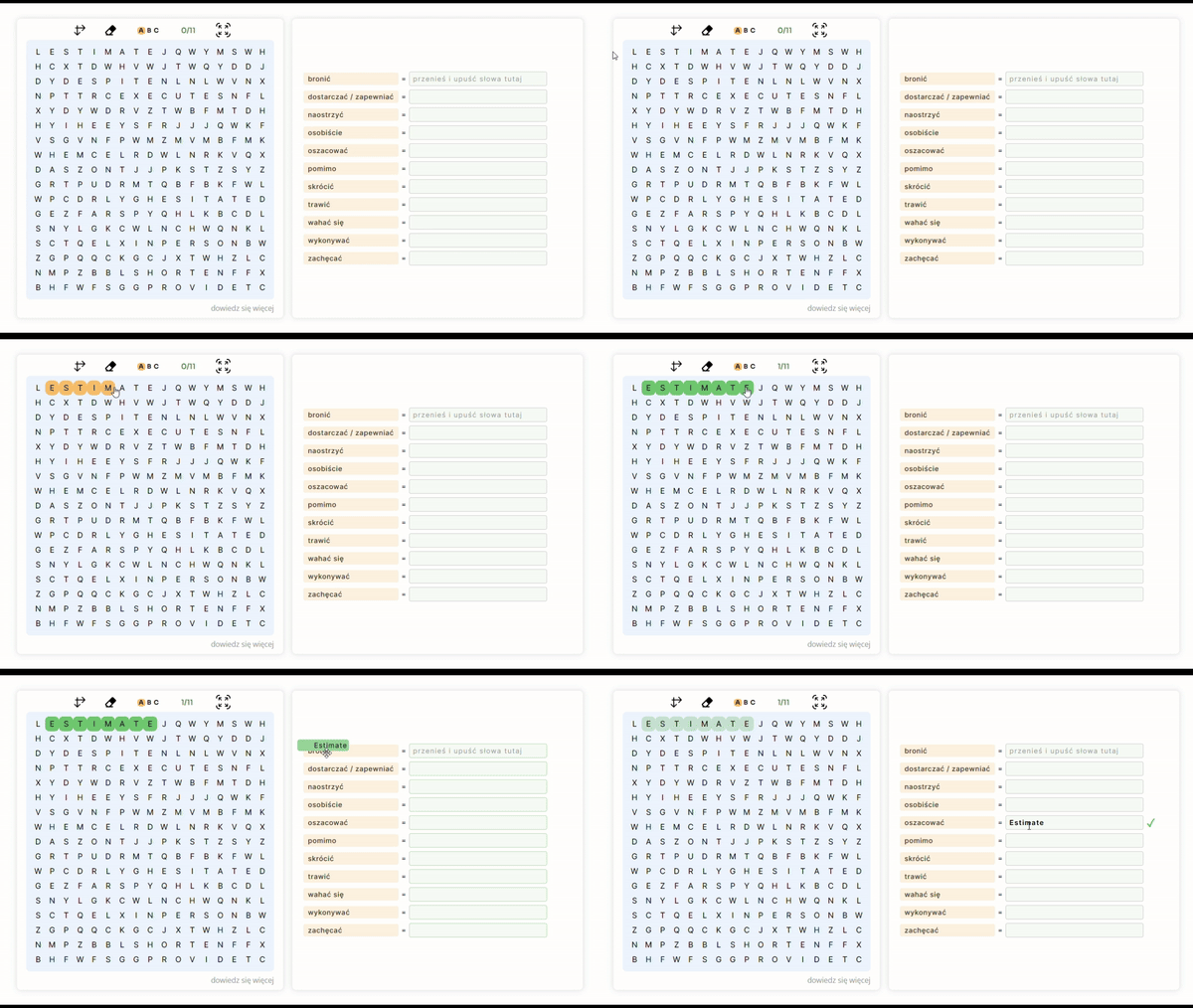
- Znajdź i zaznacz słowa w siatce. Gdy zmienią kolor na zielony chwyć i przenieś na listę obok, dopasowując znaczenia. Po dopasowaniu wszystkich słów, kliknij Kopiuj Odpowiedzi, wklej je do wiadomości i odeślij nauczycielowi.
Wskazówki
- Wymowa: Po każdym przeniesieniu słowa uczeń usłyszy wymowę w języku angielskim.
- Podpowiedzi: Przycisk ABC podświetla pierwsze litery dla łatwiejszego zlokalizowania słów.
- Każde otwarcie linku to nowe wyzwanie - słowa w siatce pojawiają się w losowym układzie. Uczeń może wielokrotnie rozwiązywać zadanie na jeden zestaw słów.
Informacja zwrotna
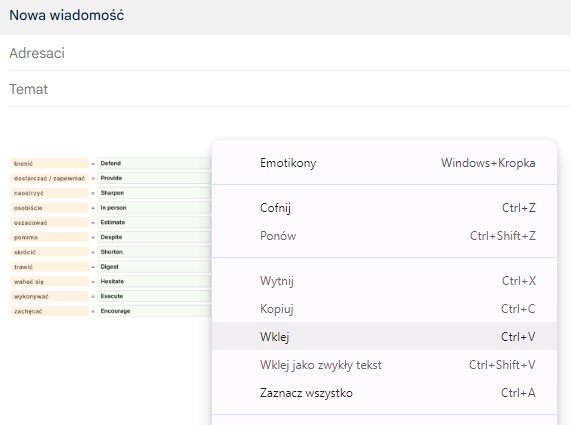
- Po ukończeniu uczeń może użyć opcji Kopiuj odpowiedzi. Screenshot rozwiązania trafi automatycznie do schowka, wystarczy wkleić go do maila lub komunikatora i odesłać nauczycielowi.
Zapisywanie
- Ćwiczenia Ad hoc: szybkie, jednorazowe zadanie (bez zapisywania) . Link działa od razu i pozostaje aktywny przez 12 miesięcy, ale po opuszczeniu kreatora nie będziesz mieć podglądu treści ani możliwości ponownego druku.
- Moje Ćwiczenia: zadania zapisujesz na zawsze, możesz wielokrotnie kopiować, drukować oraz edytować ich opisy.
Wydruki i PDF
Ćwiczenia możesz drukować:
- na stronach kreatora, zaraz po utworzeniu ćwiczenia - ikona drukarki
- z listy Moje Ćwiczenia, jeśli wcześniej zapisano je na stałe
W oknie drukowania wybierz swoją drukarkę lub zapis do PDF.
Ćwiczenia zostały sformatowane tak, aby zużywać jak najmniej zasobów.
